AI Coding Agent Guide
Best AI Coding Agents in 2026
A plain-language guide to the best AI coding agents and AI coding tools in 2026, with guidance on workflow fit, review load, rollout risk, and where each tool category makes sense.
Last reviewed July 4, 2026Record updated July 4, 2026Live now
First-wave comparisons
Start with the hub if you need the broad market picture, then move into the side-by-side pages that fit your stack and workflow.
OpenAI Codex vs Cursor vs Devin
A side-by-side look at three AI coding products for teams comparing workflow control, review flow, and deployment fit.
GitHub Copilot vs Cursor
Compare GitHub Copilot and Cursor for software teams choosing between platform depth, review flow, and daily coding speed.
Claude Code vs Codex
A terminal-first comparison for builders deciding which AI coding tool gives them better control, context, and iteration speed.
Weekly newsletter
Get the weekly AI coding tools brief
One email each week on Copilot, Cursor, Codex, Claude Code, pricing changes, and rollout moves that affect engineering teams.
AI coding agents are no longer a novelty purchase. They are a workflow choice that changes how code gets drafted, reviewed, tested, and shipped. If you are searching for the best AI coding agents or the best AI coding tools in 2026, this hub is built to separate editor copilots, terminal agents, and managed software engineers before those categories blur together in a sales call.
At a glance
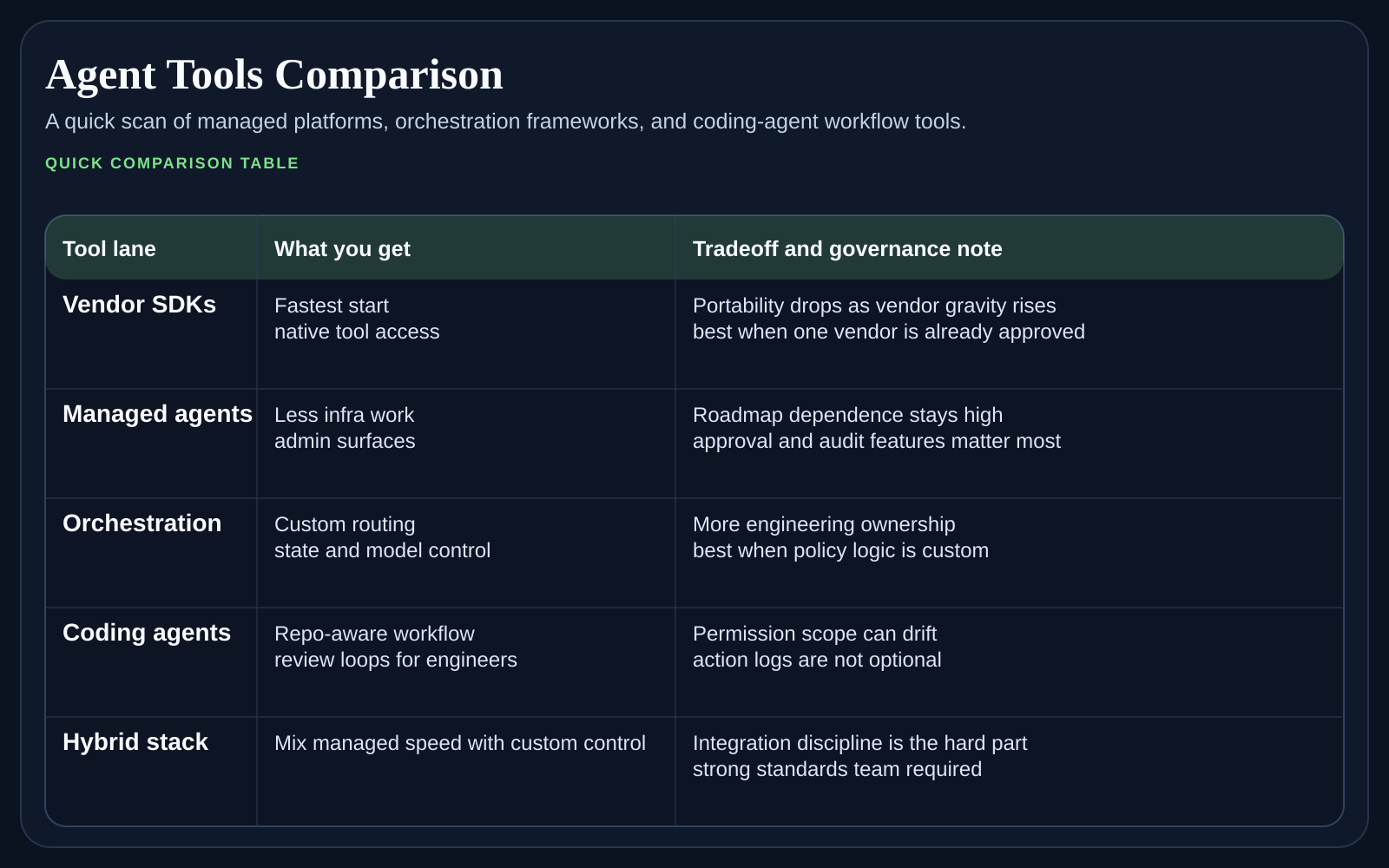
If you are searching for the best AI coding agents in 2026, the fastest answer is this: start by matching the tool to the amount of autonomy your team can actually supervise. A tool that looks impressive in a demo can still create drag if every output arrives as a large diff that senior engineers need to untangle under deadline.
How to split the AI coding agent market
The useful split is not brand versus brand. It is workflow versus workflow. GitHub Copilot and Cursor live close to the editor and speed up daily coding loops. Codex and Claude Code make more sense when the terminal, repo state, and command-line control matter. Devin sits further toward delegated execution, where the big question is not suggestion quality but task supervision and handoff discipline.
What most teams should evaluate first
Review burden. Ask how often the product creates small inspectable changes versus large patches that are expensive to reason about.
Context control. Check whether the tool works best in an IDE tab, in the terminal, or in a managed cloud workspace that owns more of the execution loop.
Security and policy fit. The best product for an individual engineer may not fit company requirements around repo access, logs, approvals, or model routing.
Upgrade path. Some tools are easy to trial but harder to standardize because pricing, seat control, or workflow ownership becomes unclear once the team grows.
Which buyer usually fits each AI coding tool category
Choose editor-first tools such as Copilot or Cursor when you want AI help inside the developer loop and expect most work to stay human-driven.
Choose terminal agents such as Codex or Claude Code when repo control, scripts, tests, and long command-line sessions are central to the workflow.
Choose delegated products such as Devin only when your team can define work clearly and absorb larger review bundles without chaos.
Mix categories if needed, but be explicit about who gets which tool and why so the rollout does not drift into a shadow-tool mess.
A simple decision path
Start by asking whether the team wants AI inside the editor, inside the terminal, or as a delegated worker that runs further from the keyboard.
Filter the list again by review culture. If reviewers hate large opaque diffs, move away from higher-autonomy tools quickly.
Then check enterprise fit, including identity, repo permissions, audit needs, and procurement comfort.
Only after those steps should you compare pricing and feature breadth.
Which page to read next
Use OpenAI Codex vs Cursor vs Devin if you are comparing three products that sit at different points on the autonomy curve. Move to GitHub Copilot vs Cursor when the question is editor workflow and platform fit. Read Claude Code vs Codex when your team cares most about terminal control and long repo sessions.
How buyers get this wrong
The common mistake is to buy for short-term speed alone. Teams should also ask who will own prompt and policy hygiene, whether junior engineers can tell when an agent is confidently wrong, and how quickly the organization can roll back a tool that starts producing noisy diffs. AI coding agents save time when the surrounding process is calm. They waste time when the process is still vague.
Common questions teams ask
What are the best AI coding agents for most teams?
Most teams should start with the category, not a brand. Editor-first tools often fit broad engineering rollouts better, terminal agents fit deeper repo control, and delegated agents fit teams that can absorb heavier review and supervision.
Should one company standardize on one AI coding tool?
Usually not at the start. Many companies do better with one default tool for the broad engineering base and a second tool for power users with different needs, as long as access rules and support ownership stay clear.
How long should an evaluation last?
Long enough to cover normal engineering work, not just a polished demo. Two to four weeks across the same repo slice usually reveals far more than a one-day bake-off.
What is the biggest rollout risk?
The main risk is hidden review cost. A tool can look fast for the author and still slow the team down if reviewers inherit bigger, messier changes every week.
How to use this cluster
Start with the comparison that matches the buying debate already happening inside your team. Once you narrow the shortlist, come back to this hub and use the sibling pages together. The point is not to crown a universal winner. It is to find the agent that fits your review culture, repo habits, and budget tolerance right now.